
If you are running business and finding customers online isn’t always about running ads or sending hundreds of cold emails.
Sometimes, your potential customers are already expressing their interest on what they need.
Most of the people looking for recommendations on Reddit and they are complaining about a problem in a facebook group. They will be looking for software alternatives in an X Community. They may even be asking for someone who can help them with a project.
Businesses face the problem in finding those conversations.
If you are searching manually, you can easily spend two or three hours every day scrolling through different social media platforms looking for customers. And after all that work, you still might miss the best opportunities.
That’s where BuyerSignal makes you a helping hand.
The idea is pretty simple. You tell BuyerSignal which communities or social media platforms you want to monitor and the tool looks through the incoming posts for potential buying opportunities. Then AI gives the scores to the leads and explains why it thinks a particular post shows buying intent.
You can then review the leads manually and decide which ones are actually worth pursuing and can convert them into potential customers.
But does that make BuyerSignal useful for your business? Let’s find out
BuyerSignal Overview
| Product | BuyerSignal |
| Category | AI Lead Discovery & Lead Scoring |
| Best For | Agencies, freelancers, SaaS founders, consultants, affiliate marketers and lead generation specialists |
| Main Use | Finding high-intent buyers across social communities |
| Platforms | Facebook Groups, Reddit and X Communities |
| Lead Scoring | 0–100 AI score |
| CRM | Built-in lead pipeline |
| Front-End Price | $29 one-time during launch week* |
| Usage System | Post Credits |
| Recommendation | 8/10 |

What Problem Does BuyerSignal Solve?
Let’s say you’re a web designer and you want to find businesses looking for a new website.
You could run Facebook ads. You could send cold emails. You could buy leads.
Or you could find people who are saying like:
“Our website looks outdated. Does anyone know a good designer?”
The person already has a problem. They may already be looking for a solution. You just need to find the conversation and approach them in the right way.
And that’s where things get difficult.
Those conversations are scattered across thousands of online communities.
You might find one good post on Reddit, another in a Facebook Group and another in an X Community.
Checking all of them manually takes time. The person asking questions in communities may get several replies within a few hours. Let’s say you find the post one or two days later, the opportunity may already gone.
BuyerSignal is built around this problem. Instead of you to constantly search these communities yourself, it monitors the sources you select and looks for posts that match the type of customer you’re trying to find.
What Is BuyerSignal?
BuyerSignal is an AI-powered social buyer-intent discovery and lead-scoring platform.
In simple terms, it looks for people who are already in interested in your products or services.
You provide the communities which needs to target and the product criteria. BuyerSignal then analyzes relevant posts and tries to determine whether the person behind the post represents a genuine buying opportunity.
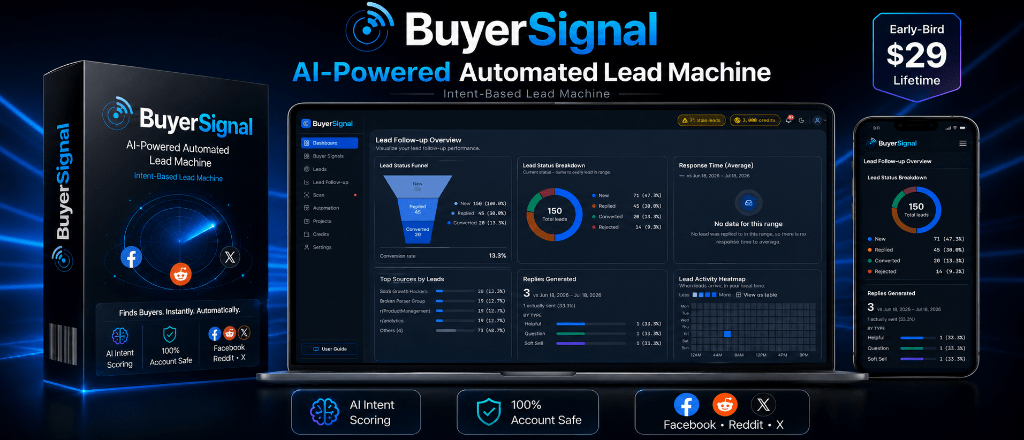
The software gives each lead a score from 0 to 100 and provides a plain-language explanation for the score.
You don’t just get a random score for the leads. Instead you get some context about why the AI tool thinks the lead is worth your attention. Then you will review the leads manually, if you think it is promising move them to any CRM and work on them to convert into customers.
Who Is BuyerSignal For?
BuyerSignal isn’t limited to one type of business.
The basic idea can work anywhere people openly discuss problems and look for solutions online.
Digital Marketing & SEO Agencies
If you provide SEO, paid advertising, web design or other marketing services, you can look for businesses discussing about those problems in relevant communities.
Instead of contacting some random people/companies, you can focus on businesses already showing some level of interest which will give high ROI.
SaaS Founders
Let’s say someone is looking for a alternative tool in which you compete, BOOM! That’s a much more relevant lead than a random person who has never heard of your product.
BuyerSignal can help you find those conversations.
Freelancers & Consultants
Copywriters, designers, developers and consultants can use social communities to find people discussing upcoming projects or asking for recommendations.
Those conversations can sometimes turn into direct client opportunities.
Affiliate Marketers
Affiliate marketers can use buyer-intent conversations to understand what people are actively looking for.
If someone is asking for a solution to a specific problem, you may be able to recommend a relevant product instead of publishing content randomly and simply hoping someone finds it.
Lead Generation Specialists
If you are in the business of generating leads, BuyerSignal could help you create another source of prospects without depending entirely on paid advertising.

What You Get With BuyerSignal
BuyerSignal focuses on a few key areas.
Here’s what each part actually does.
🔎 AI Buyer Intent Discovery
This is the core part of the platform.
BuyerSignal monitors the social communities you choose and looks for posts that could indicate buying intent.
Instead of searching for broad keywords and checking every result yourself, the AI looks at the context of the post and tries to identify whether the person has a problem that your product or service can solve.
That should make the results more useful than a simple keyword search.
🎯 AI Lead Scoring
Every analyzed lead receives a score from 0 to 100.
The score gives you a quick way to separate stronger prospects from weaker ones.
More importantly, BuyerSignal explains the reasoning behind the score in simple terms like why it given the more or less score.
For example, you might see that a lead scored highly because the person is actively looking for a solution, has described a specific problem and appears ready to consider recommendations.
That gives you more information before you decide whether to reach out.
📡 Social Community Monitoring
BuyerSignal is designed to scan targeted:
- Facebook Groups
- Subreddits
- X Communities
You choose the communities that suits to your business.
The idea is to let the software keep watching those sources instead of making you check each one manually throughout the day.
This is where you can save the time 2 to 3 hours daily.
💬 LeadFlow
Finding a lead is only half the job.
You still need to respond.
LeadFlow helps with that part by generating three different response angles like a helpful advice, a question or a soft pitch
This is a sensible approach because you shouldn’t pitch everyone immediately.
Sometimes the better first response is simply to help them.
The software can also use the context of the conversation to make the response more relevant.
You still need to read it before posting, though. I wouldn’t blindly publish an AI-generated reply to someone’s personal question.
📋 Built-In CRM Pipeline
Once you start finding leads, things can get messy quickly.
BuyerSignal includes a built-in pipeline where you can organize prospects into different stages:
New → Replied → Converted → Rejected
It also includes inactivity alerts after three days.
That’s useful because a lead-generation tool shouldn’t just dump hundreds of prospects into your lap and leave you to figure out what happens next.
You need some way to track them.
How Does BuyerSignal Work?
The workflow is simple
Step 1: Choose Your Communities
Start by selecting the Facebook Groups, Subreddits and X Communities relevant to your target market.
You don’t need to monitor everything.
In fact, you probably shouldn’t.
The quality of your sources matters because irrelevant communities will simply create more noise.
Step 2: Define What You’re Looking For
Tell BuyerSignal about the type of product, service or customer you’re interested in. This gives the AI some criteria to look for.
For example, a web design agency could look for businesses discussing outdated websites, redesigns, website problems or recommendations for designers.
Step 3: BuyerSignal Analyzes Posts
The software monitors incoming posts and evaluates them against your criteria.
It isn’t simply looking for a particular keyword.
The goal is to understand the problem being discussed and determine whether that problem represents a potential buying opportunity.
Step 4: Review the Lead Score
Each analyzed post gets a score from 0 to 100.
You can then focus your attention on the leads that look most promising.
You don’t have to treat every result as a potential customer.
That’s important.
AI scoring is there to help you prioritize, not make the final decision for you.
Step 5: Decide How You Want to Respond
When you find a promising lead, LeadFlow can generate different response approaches.
You can choose between helping the person, asking a question or making a soft pitch.
That gives you more flexibility than simply dropping the same sales message everywhere.
Step 6: Track the Lead
After you respond, you can move the prospect through the CRM pipeline.
That lets you keep track of which leads are new, which ones received a response and which ones eventually converted.
BuyerSignal Features at a Glance
| Feature | What It Does |
| Social Monitoring | Watches selected Facebook Groups, Subreddits and X Communities |
| AI Intent Detection | Looks for posts that may indicate genuine buying interest |
| Lead Scoring | Gives each analyzed lead a 0–100 score |
| AI Rationale | Explains why the lead received its score |
| LeadFlow | Creates three contextual response approaches |
| CRM Pipeline | Tracks leads from new to replied, converted or rejected |
| Inactivity Alerts | Alerts you when a lead has had no activity for three days |
| Post Credits | Charges based on unique analyzed posts rather than duplicate post IDs |
| Unlimited Sources | Lets you monitor multiple relevant communities |
| Unlimited Projects | Supports multiple lead-generation projects |
The Post Credit System
This is one part of BuyerSignal that deserves attention.
The software uses Post Credits.
The basic idea is:
1 Post Credit = 1 unique analyzed post.
If the same post appears again, BuyerSignal doesn’t charge you another credit for the duplicate post ID. Quite interesting right!
That’s a nice approach because you’re paying for actual analysis rather than repeatedly paying for the same piece of content.
The platform also positions its plans around unlimited sources and unlimited projects.
| What I Like | What I don’t |
| It focuses on intent, not just keywords | AI won’t always understand intent perfectly |
| It can save a lot of manual searching | You still need to engage like a human |
| The lead score gives you a starting point | The quality of your communities matters |
| The response suggestions are practical | It doesn’t replace your sales process |
| The built-in CRM makes the workflow easier |
Is BuyerSignal Easy to Use?
The basic workflow shouldn’t be difficult to understand.
You choose your communities, define what you’re looking for and let the system analyze incoming posts.
The harder part isn’t using the software.
It’s defining what a good lead actually looks like.
For example, if you’re a graphic designer, “people talking about logos” is probably too broad.
You’d get better results by focusing on conversations where someone is actively looking for branding help, asking for a designer or discussing a project they’re about to start.
The criteria should be clear which helps in getting the good leads.
So I wouldn’t look at BuyerSignal as something you set up once and forget about.
You’ll probably want to refine your projects as you learn which types of conversations turn into real opportunities.
Who Should Use BuyerSignal?
Agencies
If your agency needs a consistent flow of potential clients, finding businesses that are already asking for help can be more useful than contacting completely cold prospects.
Freelancers
A freelancer can use relevant communities to find people actively discussing projects and looking for specialists.
SaaS Founders
If people are complaining about existing software or looking for alternatives, those conversations can give you valuable customer acquisition opportunities.
Consultants
Consultants can look for people openly discussing the problems they solve.
Affiliate Marketers
If you promote products that solve specific problems, buyer-intent conversations can give you a way to find people who are already looking for those solutions.
Lead Generation Businesses
If lead generation is your service, BuyerSignal can become another prospecting channel for your own business or your clients.
Who can skip it?
I wouldn’t recommend buying BuyerSignal simply because it has AI in the name.
If your business doesn’t have a clear target customer or you don’t know what type of problem your product solves, the software won’t fix that.
I’d also skip it if your entire sales strategy depends on paid ads and you have no interest in community-based prospecting.
The tool is most useful when your customers actually discuss their problems on the communities you’re monitoring.
BuyerSignal Pricing
BuyerSignal is being offered at $29 one-time during launch week for lifetime core access.
That’s a low entry price compared with paying for a lead-generation service every month.
But there’s an important point here.
Don’t buy it just because $29 sounds low price.
The real question is whether your customers are active in the communities you want to monitor.
If they are, the potential time savings could make the purchase worthwhile.
If they aren’t, even a cheap lead-generation tool isn’t going to create useful prospects out of nowhere.
I’d also check the current sales page before purchasing because launch pricing and access terms can change.
My Verdict
I like the basic idea behind BuyerSignal.
There are already thousands of people discussing problems online every day. Some of them are simply asking questions. Others are actively looking for recommendations, software or someone who can help them.
The difficult part is finding the right conversations at the right time.
That’s the problem BuyerSignal is trying to solve.
The AI lead scoring is useful because it gives you a way to prioritize the conversations that appear more promising. The LeadFlow feature is also practical because it helps you think about how to approach the person instead of immediately sending a generic pitch.
And the built-in CRM makes the whole thing more useful than a simple social listening tool.
But I wouldn’t treat BuyerSignal as an automatic customer machine.
You still need to choose the right communities. You need to define your ideal customer properly. You need to read the conversations yourself. And most importantly, you need to interact with people like a real person.
If you do that, BuyerSignal could save you a lot of time.
For an agency, freelancer, SaaS founder, consultant, affiliate marketer or lead-generation specialist who already uses Reddit, Facebook Groups or X to find prospects, BuyerSignal is worth considering.
The biggest value isn’t that it “finds leads with AI.”
It’s that it can take a task that normally requires hours of scrolling and turn it into a list of potential opportunities that you can review and act on.
My take: BuyerSignal makes sense if social communities are already part of your customer acquisition strategy. Just don’t expect the software to replace your sales skills.